
Visual UGC
Why You Should Use Visual UGC
- Authentic and high-quality UGC (User Generated Content) provides social proof, increasing consumer trust in the brand or product and boosting purchase behavior.
- Exquisite images and engaging visual content from Instagram—whether created by the e-commerce site itself or generated by consumers—enhance the website's visual appeal and improve consumer retention and interaction.
Architecture Overview
The entire Visual UGC feature can be understood through three main blocks and four key terms:
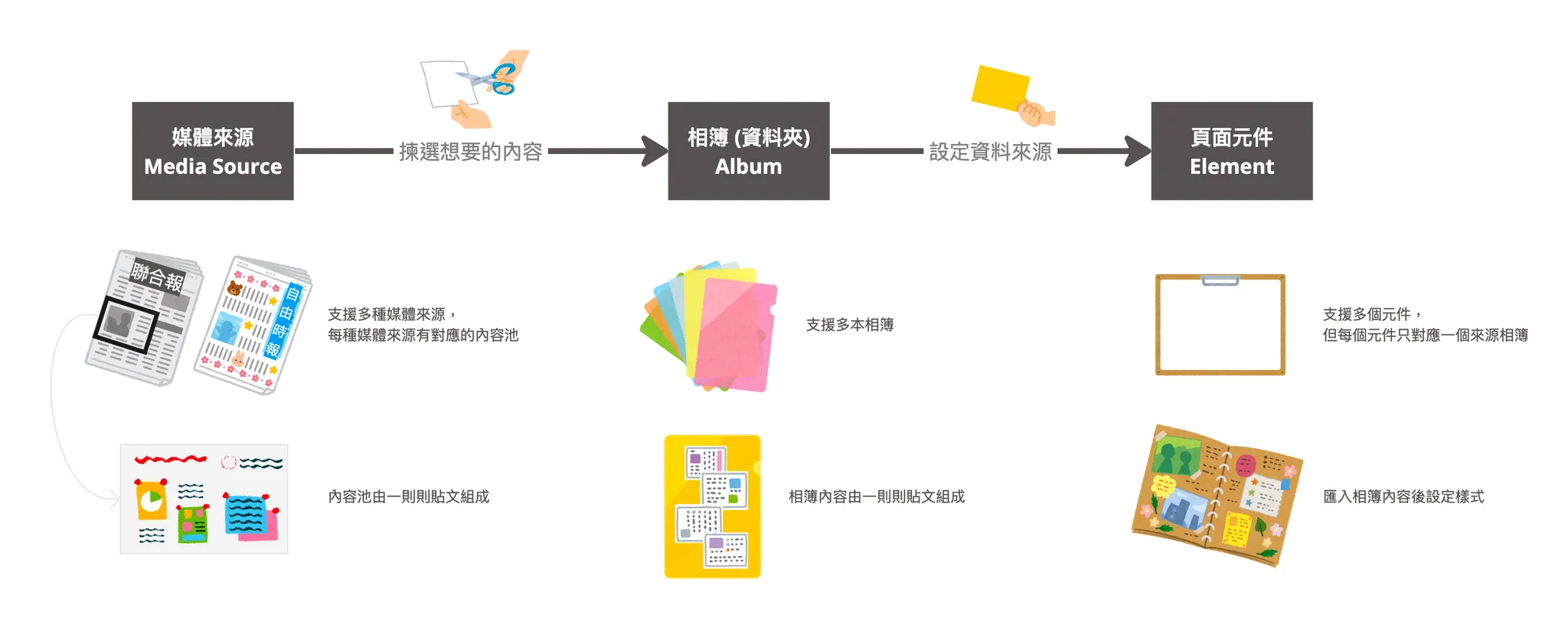
| Term | Analogy | Description |
|---|---|---|
| Media Source | Newspaper | If "Media Source" is a newspaper, the "Content Pool" of different sources is like different brands of newspapers: Media Source A (My account uploads) ↔︎ The New York Times Media Source B (A specific #hashtag) ↔︎ The Wall Street Journal |
| Post | News Report | Individual "Posts" in the content pool are like individual reports in a newspaper: Post A ↔︎ "Giant Rubber Duck Returns! New Year Sightseeing Attracts 1 Million Visitors" Post B ↔︎ "Sanrio Fans Rejoice! Kitty and Pompompurin Appear at Local Cafe" Post C ↔︎ "2023 Sanrio Character Ranking Results! Pompompurin is the Top Favorite" |
| Album | Folder | In a newspaper, not every report is worth keeping. Usually, you clip reports related to a theme and store them in a folder. "Albums" are like folders; they are carriers for storing and managing high-quality posts that fit your brand tone for future use. |
| Campaign Component | Scrapbook | In the final stage, you take clips from your folders and paste them onto a scrapbook to create a layout and style. The IG Gallery component in Campaign Star is like a scrapbook: you decide which album to pull data from, then determine the display method and style in the component settings. |
Quick Start Guide
- Go to [Campaign Star] > [Visual UGC] > [Account Management] in the left menu. Click "Connect Instagram Account" and complete the setup in the Facebook Login popup to link your Instagram Business Account.
- Go to [Campaign Star] > [Visual UGC] > [Media Sources] in the left menu:
- In the "My Posts" tab, view posts published by this Instagram Business Account (synced once daily).
- In the "Hashtags" tab, set up to 5 #hashtags you wish to track and view related posts (synced once daily; note that new hashtags may take a day to sync).
- Pick the posts you like and click "Add to Album" to save them into a custom album folder.
- Go to [Campaign Builder] > [Visual UGC] > [Albums] in the left menu:
- View all album lists.
- Click an album to view its posts, set sorting rules, pin posts to the top, or show/hide specific posts.
- Select an album and click "Add to Campaign Page" to include it in the desired page.
- After successfully adding an album to a campaign page, the system will redirect you to the Page Editor and automatically add an Instagram Gallery component at the bottom of the existing content.
- In the editor canvas, click the "Instagram Gallery" component and adjust the detailed UI styles in the right-side settings panel.
- Click the "Save" or "Save & Publish" button in the top operation bar.
Feature Introduction
- Visual UGC > Account Management
- Visual UGC > Media Sources
- Visual UGC > Albums
- Campaign Star Component: Instagram Gallery
Updated 8 months ago
Did this page help you?