
View Campaign Page Performance
Important ReminderTo ensure that the Campaign Star reports in the AMP backend display data correctly, your online store must have awoo Pixel installed.
1. Basic Performance in Campaign Management List
From the side menu in the AMP backend, enter the Campaign Management list. You can click on the leftmost side of any campaign page's data row to expand its basic performance data.
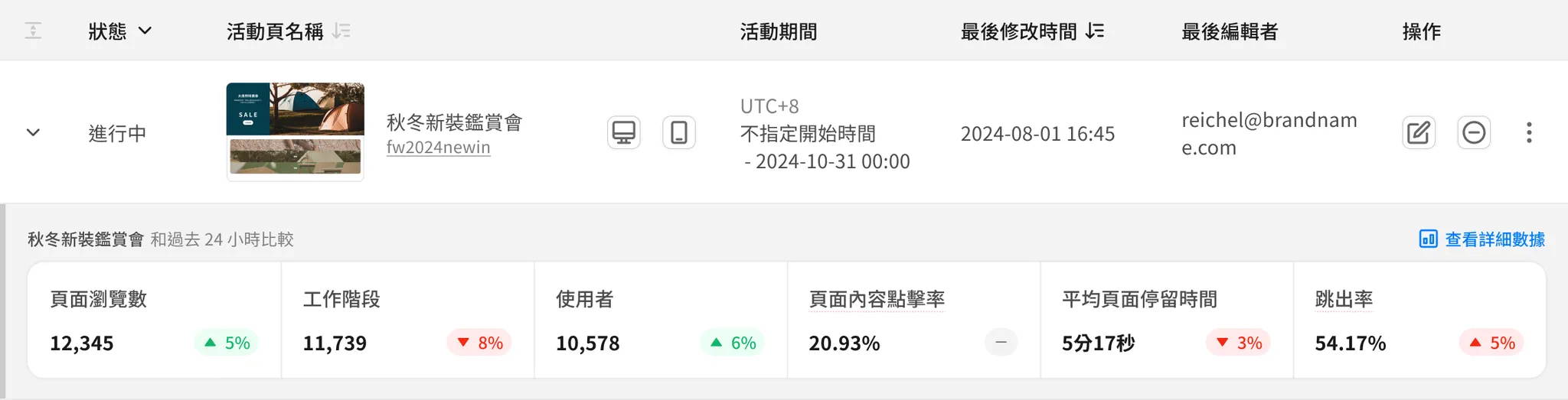
📊 Data Presentation
-
Update Frequency: Updated every hour at the 40th minute.
-
Data Period: Fixed cumulative data up to the 59th minute of the hour preceding the last update (customization is not available).
- Example 1: Viewing at 12:34 on 9/19; since the last update was at 11:40 on 9/19, data is cumulative up to 10:59 on 9/19.
- Example 2: Viewing at 12:55 on 9/19; since the last update was at 12:40 on 9/19, data is cumulative up to 11:59 on 9/19.
-
Each metric shows the historical cumulative value and a comparison (increase/decrease) with the "Past 24 Hours":
-
Comparison Targets:
- Current Period: 24 hours starting from (and including) the "hour of the last update."
- Previous Period: The 24-hour window immediately preceding the current period.
-
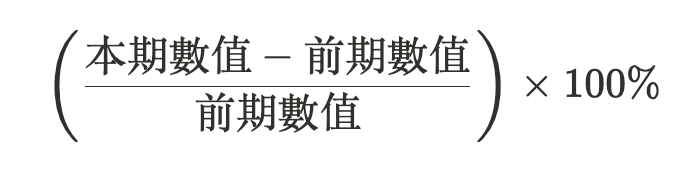
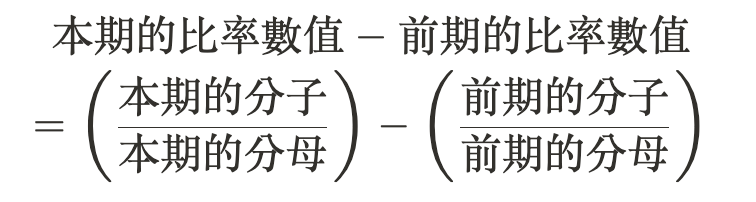
Calculation:
-
General Metrics:
-
Ratio Metrics:
-
-
Display Rules:
- If performance improves or remains flat, it is marked with a green background.
- If performance declines, it is marked with a red background.
- If no data is found or cannot be calculated, it is marked with a gray background.
Note: The "Bounce Rate" metric is the opposite of other metrics:
- A decrease in value is considered improved performance and shown in green.
- An increase in value is considered declined performance and shown in red.
-
🧮 Metric Definitions
| Metric Name | Definition |
|---|---|
| Page Views | The number of times this campaign page was viewed. |
| Sessions | The number of sessions that included a view of this campaign page. |
| Users | The number of unique users (User IDs) who viewed this campaign page. |
| Page Content CTR | During a single page view, (Times where at least one link on the campaign page was clicked) ÷ (Total views of this campaign page). ※ "Links on the campaign page" include categories in a Category list, products in a Product list, and custom links for Button/Image components. ※ When calculating CTR, all click events within a single page view count as at most one click (a binary concept of "did they click or not"). Therefore, it cannot exceed 100%. |
| Average Time on Page | (Total duration spent viewing this campaign page) ÷ (Total views of this campaign page). |
| Bounce Rate | (Sessions where this page was the landing page and the user left the site after viewing only this page) ÷ (Total sessions where this page was the landing page). ※ Note: This differs from the GA4 calculation, which uses engagement rate. |
2. Complete Report on Detailed Performance Page
In the basic performance section of the Campaign Management list or under "More Actions," you can click "View Detailed Data" to access the full report for the corresponding campaign page.
📊 Data Presentation
- Update Frequency: Updated every hour at the 40th minute.
- Data Period: Defaults to the last 7 days including today; can be customized.
- Max query period per request: 12 months.
- Earliest selectable date: One year ago.
- Basic operations and chart logic are identical to current AMP Analytics reports. The only difference is the Hourly Line Chart:
- When the data period is ≤ 14 days, you can switch the line chart unit to "Hour," aggregating data by each hour point.
- When to use: Use hourly charts to analyze changes in performance across different times of the day (e.g., daytime vs. after 8 PM vs. midnight).
🧮 Metric Definitions
(1) Page Visits
| Metric Name | Description |
|---|---|
| Page Views | Number of views for this campaign page. |
| Sessions | Number of sessions that viewed this campaign page. |
| Entrances | Number of sessions where this page served as the landing page. |
| Users | Number of unique users (User IDs) who viewed this page. |
| New Users | Number of unique users who visited the site for the first time with this page as the landing page. |
(2) Page Interaction
| Metric Name | Description | Notes |
|---|---|---|
| Page Content CTR | During a single page view, (Times where at least one link on the page was clicked) ÷ (Total page views). |
|
| Page Content Clicks | Total number of clicks on any link on this campaign page. |
|
| Category Clicks | Number of clicks on any item in a Category list. |
|
| Product Clicks | Number of clicks on any item in a Product list. |
|
| Average Time on Page | (Total duration spent viewing this page) ÷ (Total page views). | |
| Bounce Rate | (Sessions where this was the landing page and the user left after only viewing this page) ÷ (Total sessions where this was the landing page). |
|
(3) Sales Conversion
| Metric Name | Description | Notes |
|---|---|---|
| Campaign Generated | Product Revenue | Product revenue generated when a user views this campaign page, clicks a product, and immediately adds it to the cart and completes the purchase within the same session. |
|
| Campaign Generated | Product Purchase Rate | In the same session, (Times where a user viewed this page, clicked at least one product, and completed the purchase) ÷ (Total page views). |
|
| Campaign Generated | Add to Cart Rate | In the same session, (Times where a user viewed this page, clicked at least one product, and added it to the cart) ÷ (Total page views). |
|
| Campaign Assisted | Order Revenue | Total transaction amount of all completed orders in sessions where this campaign page was viewed. |
|
| Campaign Assisted | Order Transaction Rate | In sessions where this page was viewed, (Completed orders) ÷ (Total sessions). |
|
| Campaign Assisted | Add to Cart Rate | In sessions where this page was viewed, (Add to cart events) ÷ (Total sessions). |
|
Quick Review: Direct Conversion vs. Assisted Conversion
Direct Conversion (Product-level): Last-Click
(Example) While at a pharmacy, you see a Father's Day promo at the toothpaste counter. You put a toothbrush from that counter into your basket and checkout immediately without picking the same item elsewhere.
👉 The credit for this sale belongs 100% to that promo board!Assisted Conversion (Order-level): Assisted
(Example) While at a bookstore, you first put a puzzle in your basket in the lifestyle section. Then you see a "Bill Gates' Recommended List" poster in the business section. You continue browsing the manga and stationery sections, picking up a comic book and a pencil case, then checkout.
👉 If the poster hadn't caught your eye, you might have left without the comic and pencil case. Therefore, the poster gets partial credit for the entire transaction!
(4) Top Category List Items
| Metric Name | Description | Notes |
|---|---|---|
| Category Name | The name of the Category list item clicked on this campaign page. Click the hyperlink to visit the destination URL. | |
| Category Tags | The awoo tag combination corresponding to the Category list item. Shows "-" if no tags are set; shows "Sports Shoes" if set to [Sports][Shoes]. | |
| Clicks (Specific Category) | Number of times the specified category item was clicked. |
|
| View-to-Click Rate (Category) | In a single page view, (Times where this specific category was clicked at least once) ÷ (Total page views). |
|
(5) Top Product List Items
| Metric Name | Description | Notes |
|---|---|---|
| Product Title | The title corresponding to the product PID in the Product list. Click the link to go to the store page; hover to see the Product feed image. |
|
| Clicks (Specific Product) | Number of times the specified product item was clicked. |
|
| View-to-Click Rate (Product) | In a single page view, (Times where this specific product was clicked at least once) ÷ (Total page views). |
|
| Unique Product Purchases | In the same session, number of times this product was clicked after viewing the page, added to cart, and purchased. |
|
| Click-to-Transaction Rate (Product) | In the same session, (Unique purchases of this product) ÷ (Clicks of this product). |
|
| Product Quantity Sold | Total quantity of the specified product sold directly after viewing the page and clicking the item in the same session. |
|
| Product Revenue (Specific) | Total revenue for this product generated directly from the campaign page. |
|
Updated 8 months ago